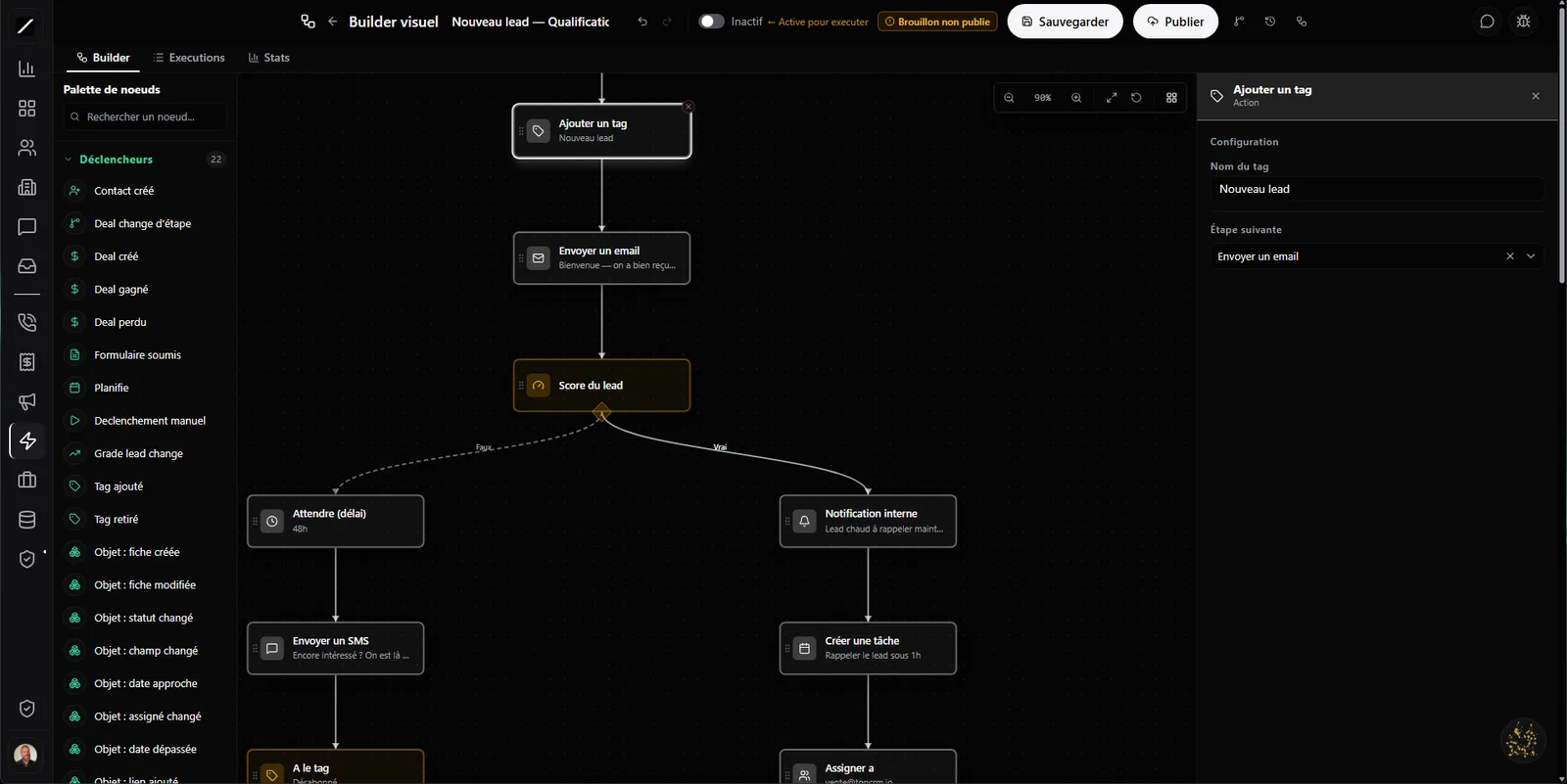
A visual builder — the experience of the big tools, without the price.
Building an automation in toncrm is visual and intuitive: a canvas where you drag blocks and link them to draw out your scenario. You stick on sticky notes, group blocks into frames, undo and redo, select and copy several blocks at once, you've got a minimap to find your way in a big workflow, a command palette and a search. It's the experience of the pro automation tools agencies pay a lot for — except it's built into your CRM, not an external service duct-taped on.
And each block is simple to configure: you click it, you fill in what it does, and you can drag your contact's variables (first name, company, last purchase) straight into your messages. No code to write, no hundred-page manual to read before you start.
52 blocks that drive your whole CRM.
How powerful an automation is depends on what it can do — and here, it's pretty much everything. 52 block types: 22 triggers, 23 actions and 7 conditions.
101 triggers — anything can set an automation in motion.
An automation starts on an event, and toncrm recognizes 101. A won deal, a submitted form, a finished call, a paid invoice, an added tag — each one can launch a workflow. That's what makes Workflows the backbone of automation: more than thirteen other modules send their triggers here. Your whole CRM talks to your workflows.
And eleven of these triggers are about your custom objects: you can automate any business object you've created — a « Purchase offer », a « File », a « Property » — exactly like a contact.
Much more than « if this, then that ».
When your scenario gets complex, the blocks keep up. A multi-branch switch sends each contact down the right path based on a value; a deterministic A/B test splits your audience in two — and the same contact always lands on the same side, so your results are reliable, not muddied by chance. You build reusable sub-workflows (a block you reuse everywhere), you loop over a list, you drop in a human approval (the workflow stops and waits for your OK), or you make it wait for an event to happen before continuing.
And your messages are personalized on their own: you drag variables from the contact, the deal or your company straight into the text. A controlled re-enrollment (a maximum + a wait delay) keeps the same contact from looping back through the sequence.
Automation that doesn't crash, and doesn't spam.
The worst thing with automation is the silent error that keeps firing and spams your clients without you knowing. toncrm has a circuit breaker: a workflow that fails five times in a row pauses itself and sends an SMS to the admin. No junk running in a loop behind your back.
The other way around, for your critical emails, a transactional safety net guarantees the message goes out anyway. Your automation is a reliable asset, not a time bomb: if something goes sideways, the system warns you and protects itself — instead of you discovering the mess when an angry client calls.
It waits for days… business days.
A delay in a workflow is useful — but a reminder that goes out on a Sunday night or on June 24 looks robotic and hurts you. toncrm has a « business hours » wait block that skips weekends and Quebec statutory holidays. You say « wait two days », and the reminder goes out Monday at 9 a.m. — not on the weekend, not on a holiday. The kind of detail that makes your automation look like it was thought up by someone who lives here. Because it was.
The client replies? The automation pauses.
There's nothing more awkward than an automated sequence that sends a « just wanted to follow up » to a client who already replied yesterday. toncrm avoids that: when a contact replies (by email or SMS) to a sequence, their workflows pause automatically and your team is notified.
The automation knows when to go quiet and let the human take over. Your client feels looked after, not harassed by a robot running its script without listening.
Test, version, roll back.
Changing an automation that works is stressful — except toncrm gives you a net. You can run a dry-run: you test your workflow with no real effect, no email actually sent, just to see it does what you think. And versioning keeps a draft version and a published version, with a diff of the changes and a one-click restore, plus a log of who changed what.
You start a draft version, dry-run it, publish it when you're comfortable — and if the new version performs worse, you go back to the old one in one click. Your automations evolve risk-free.
Oracle pilots your automations.
You don't have to dig through menus to manage your workflows: you can ask Oracle to list your workflows, analyze the performance of one of them, or to pause or resume it. « Oracle, pause that workflow », « which one performs best this month? » — and it takes care of it, without you leaving your conversation.
Each module has its own automations.
When you've got a lot of workflows, one giant list quickly becomes a mess. toncrm organizes them by module: your quote automations live in the quotes section, your invoice ones with your invoices, your booking ones with your booking — not drowned in a master list.
And some are already installed from the start (ready-to-use quote workflows), so you don't start from a blank page. You find the right automation right where you work.
Workflows, in brief.
Everything about workflows.
Drag your first workflow.
14 days free, no card. Or book a demo and we'll build your first automation with you.
We'll build your first automation with you in a demo.
