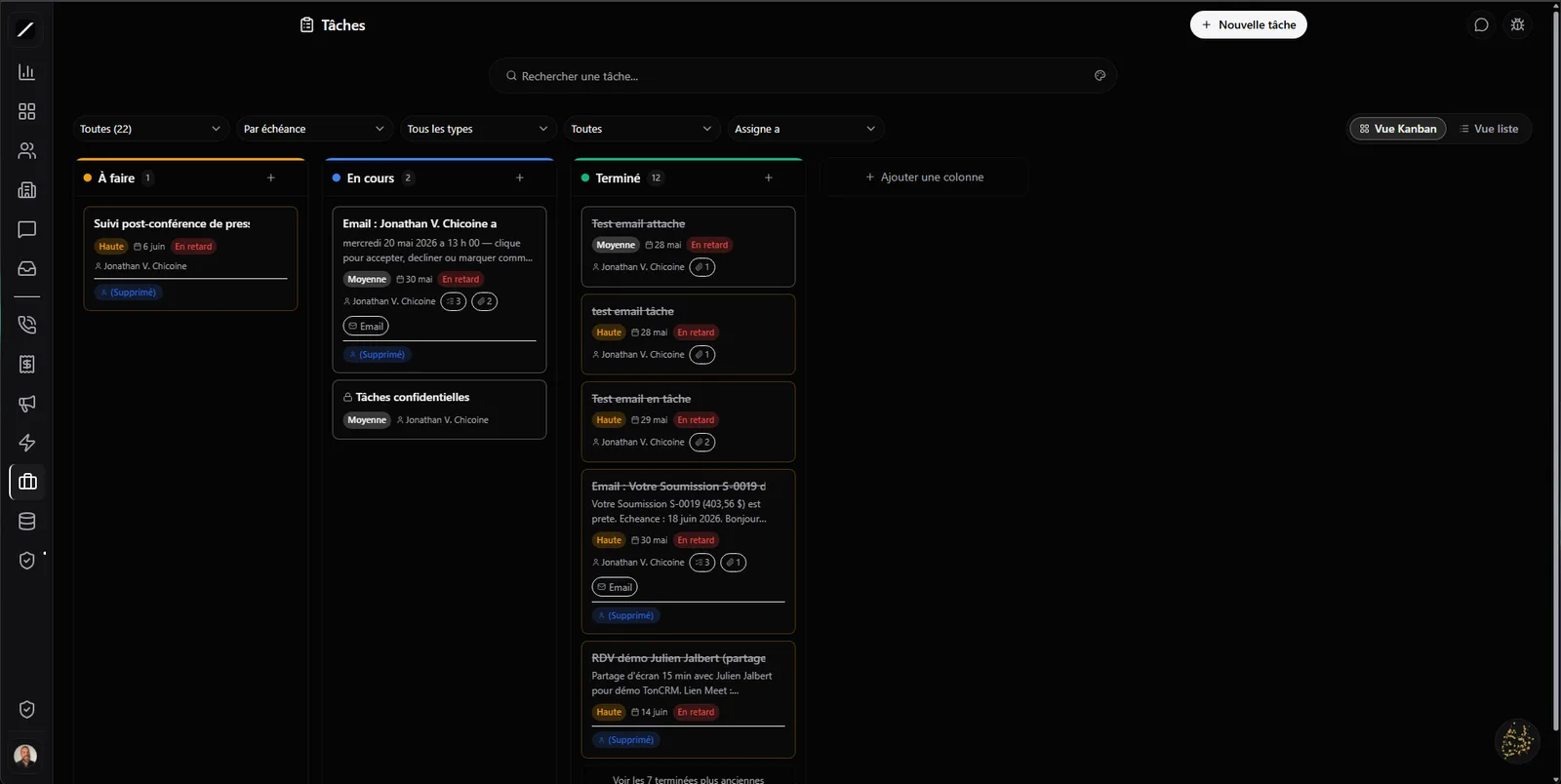
Your columns, your names, your colors.
The task board is a drag-and-drop Kanban — except the columns are yours. You name, recolor and reorder them, just like your sales pipeline. « To plan », « Waiting on client », « Delivered » — your flow, not an imposed one.
And your drag-and-drop is solid: when you move a card, the change saves itself and survives even if you close the tab or switch pages mid-drag. No card that snaps back to its old spot because the save didn't have time. You also get a list view sortable by due date or priority.
The task gets created, and it finds the right person.
A task can appear on its own in three places: a reminder detected at the end of a Clodyne call, a command to the assistant, or the qualification of a new lead. And the moment it appears, it routes to the right employee based on their role — not into a shared inbox where it sleeps.
Subtasks, comments, attachments.
A task isn't just a line with a date. You open it and you've got a real record: subtasks (a checklist of steps), a comment thread for your team, and attachments (up to 10 MB each). The level of detail of big project-management tools, built into your CRM.
Since everything is linked to your contacts and your deals, the task lives where the work actually lives — not in a separate to-do app nobody opens.
Every Monday, it comes back on its own.
The things that keep coming back — the weekly follow-up, the monthly check-in, the end-of-month report — you set them up once as a recurrence and they reappear on their own by your rule (every Monday, the 1st of the month, every two weeks). You stop relying on your memory for repetitive tasks: the system handles it.
An email becomes a task.
A client writes you a request in the middle of twenty other emails? You turn it into a task in one click, straight from your inbox. The task keeps a source chip and a back link: one click reopens the original email to reread the context. Nothing gets lost at the bottom of your inbox.
You know who created each task.
Every task carries its source: a human, Clodyne after a call, Oracle, an automation, or a converted email. At a glance, you know where it came from — handy to understand your flow and keep your data clean.
And no one misses an assignment: when a task is assigned to you, you're notified (in the app and via push); and when it's done, the person who assigned it is alerted. The work tracks itself.
Views that tell you what to do first.
Instead of one giant list, you switch between planning views — today, upcoming, what you delegated, all, done — with filters by priority, type or assignee, and a detail panel on click. You know what to tackle first without digging.
Tasks, in brief.
Everything about tasks.
Let your tasks create themselves.
14 days free, no card. Or book a demo and we'll set up your board with you.
We'll set up your board with you in a demo.
