Aller au contenu principal
FIG 0.0 · PIPELINE

Your pipeline triggers your workflowson its own.

The deal Kanban wired into your whole CRM. You drag a deal, and the email goes out, the invoice gets created, and Google Ads knows you signed. Multi-pipeline, AI forecast, bulk actions.

Free 14-day trial

No credit card required.

FIG 0.1 · CASCADE

You drag a card. Here's the cascade.

The deal moves on screen right away (optimistic UI), the DB syncs behind. 5 native workflow events: created, stage changed, won, lost, assigned. 1 gesture — 3 tools would've taken 3 moves.
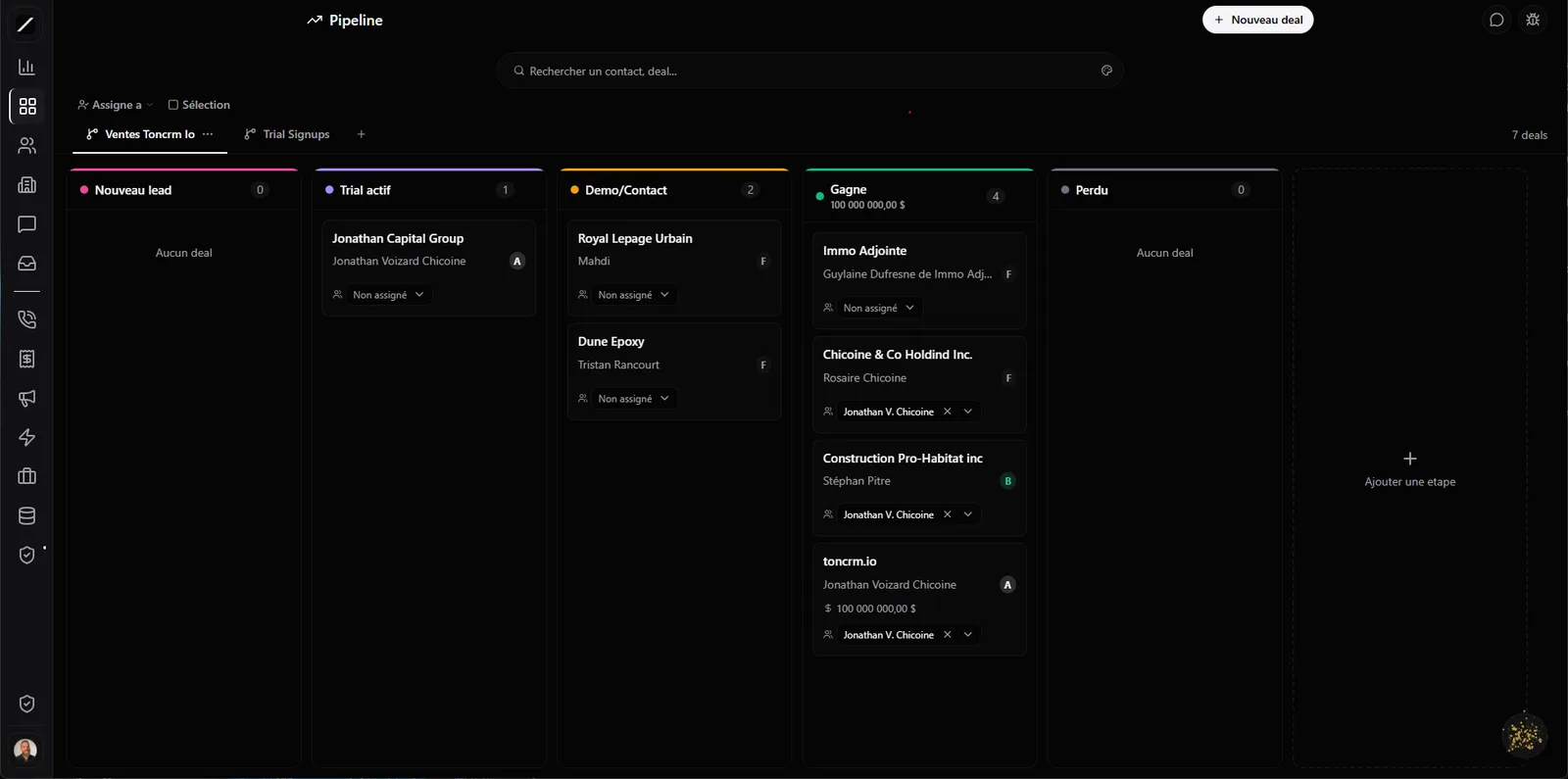
toncrm.io Kanban pipeline: New lead, Active trial, Demo/Contact, Won and Lost columns, with deal cards, their grade and their owner.
FIG 0.2 · MULTI-PIPELINE

Sales, Service, After-sales, Recruiting — without mixing it all up.

As many pipelines as you want, tabs + direct URL link. The « Candidate » (hiring) pipeline is separate from the leads pipeline — you don't mix your clients with your potential employees.

SalesServiceAfter-salesHiring
New2
Plomberie Rivard
Garage Néon
Qualified1
Clinique Lavoie
Won1
Réno Bouchard
FIG 0.3 · TEMPLATES

You don't start with a blank page.

6 pre-configured pipelines, with their stages and their colors. You tweak, off you go. 24+ colors per stage, « won / lost » stages pinned at the end.

B2B Sales
Construction
Coaching
Pro service
E-commerce
Brokerage
New2
Plomberie Rivard
Garage Néon
Qualified1
Clinique Lavoie
Won1
Réno Bouchard
Columns at 88% · snap-center · one hand
FIG 0.4 · ON-SITE DRAG

One thumb, one hand, on a jobsite.

Drag-and-drop has separate mouse/touch sensors (250 ms + tolerance, no stray swipe). On mobile, columns take up 88% of the screen with snap-center — you always see 10% of the next one. Built for one hand, not for a desk.

FIG 0.5 · BULK ACTIONS

Select 50 deals. Assign them. 50 emails go out. 1 click.

Multi-select → move / assign / archive / delete (up to 100 deals). Each action triggers the workflows. Archive ≠ Delete — distinct and reversible.

vs the others: Pipedrive does bulk-assign without chaining a workflow. HubSpot makes you pay for Operations Hub. Here it's native.
50 deals selectedMoveAssignArchive
50 workflows triggered
Réno Bouchard inc.
Marie-Claude Roy
A
12 000 $
FIG 0.6 · SCORE ON THE CARD

Your lead's grade, right on the deal card.

A / B / C / D / F shows up on the card, without opening the record. You see at a glance which deal to push first.

FIG 0.7 · AI FORECAST

Your next 30 days in CAD, calculated without you.

Oracle weights each deal by its stage and by your historical conversion rate → a 30-day forecast in Canadian dollars.

Forecast my revenue for the next 30 days
Oracle
Weighted forecast: ~38 400 $ CAD over 30 days (12 active deals, weighted by stage × your 28% closing rate).
Create a deal for Marie-Claude at 12 000 $ in Sales
Oracle
✓ Deal created in Sales — « Marie-Claude » · 12 000 $ · New stage.
Analyze my pipeline, where's it stuck?
Oracle
Closing rate: 28 %. Breakdown: 24 New · 16 Qualified · 9 Proposal. 10 deals stuck > 14 days — follow-up suggestions ready.
FIG 0.8 · STALLED DEALS

Oracle tells you which ones to follow up on.

« Analyze my pipeline, where's it stuck? » → Oracle pulls your closing rate, the breakdown by stage, and the 10 deals stuck for more than 14 days with follow-up suggestions.

FIG 0.9 · VELOCITY BY STAGE

How long a deal lingers at each stage.

Median and p90 of time spent per stage. A red « stuck » badge lights up on deals that are too slow. You see where your process chokes, not just where your deals are.

New2 d
Qualified5 d
Proposal11 d · stuck
Negotiation4 d
FIG 1.0 · GOOGLE ADS LOOP

Google Ads knows when you sign a client. Not just when they click.

Deal won → conversion sent to Google Ads with the contact and the amount. The loop closes.

Ad
Lead
CRM
Revenue
Optimization
vs the others: HubSpot only does it through Marketing Hub Pro. Not native in Pipedrive or GoHighLevel for CAD.
FIG 1.1 · THE DETAILS THAT MATTER

The kind of stuff you only notice when it's missing elsewhere.

Configurable card fields
Pick what shows on the deal card — up to 12 toggleable fields, per pipeline. Your Kanban, your info.
Inline notes on the deal
A quick note right on the card, without opening a separate notepad.
Editable amount on the card
Adjust a deal's amount anytime, not just at creation.
Anti-deletion guard
You can't delete a stage that still holds deals — it offers to move them first.
Amount hidden by role
Your reps don't see all the numbers.
Movement history
On every deal, as a localized timeline.
Deleted contact ≠ lost deals
Deleting a contact doesn't erase its deals (Law 25 friendly — the sales history stays).
Deal duplication
In 1 click.
Real time
A coworker moves a deal, your screen moves.
FIG 1.2 · FAQ

Everything about the pipeline.

Yes — 5 native workflow events fire your emails, invoices or tasks.

As many as you want, each separate, with 6 templates to get started.

Weighted by stage and by your historical conversion rate, recalculated by Oracle.

Yes, up to 100 deals at once, with workflow dispatch.

A conversion fires when you win a deal — the ad → revenue loop closes.
L'entrepreneur d'aujourd'hui
FIG 1.3 · GET STARTED

Drag your first deal.

14 days free, no card. Or book a demo and we'll set up your pipeline for your trade.

Free 14-day trial

We'll set up your pipeline for your trade in a 45-sec demo.

Essai gratuit 14 joursAppeler Clodyne

Ready to see toncrm.io for real? We show it to you set up for your trade.

Book a 15-minute demo — or start your free trial right away.

Free 14-day trial

No credit card · Setup done for you · French-language support

Features