Aller au contenu principal
FIG 0.0 · GOALS

Your goals trackthemselves.

Set a goal, hook key results to it, and the CRM tracks progress every day from your deals, your invoices, your CSAT, your contacts and your tasks. Zero data entry, zero spreadsheet.

Free 14-day trial

No credit card required.

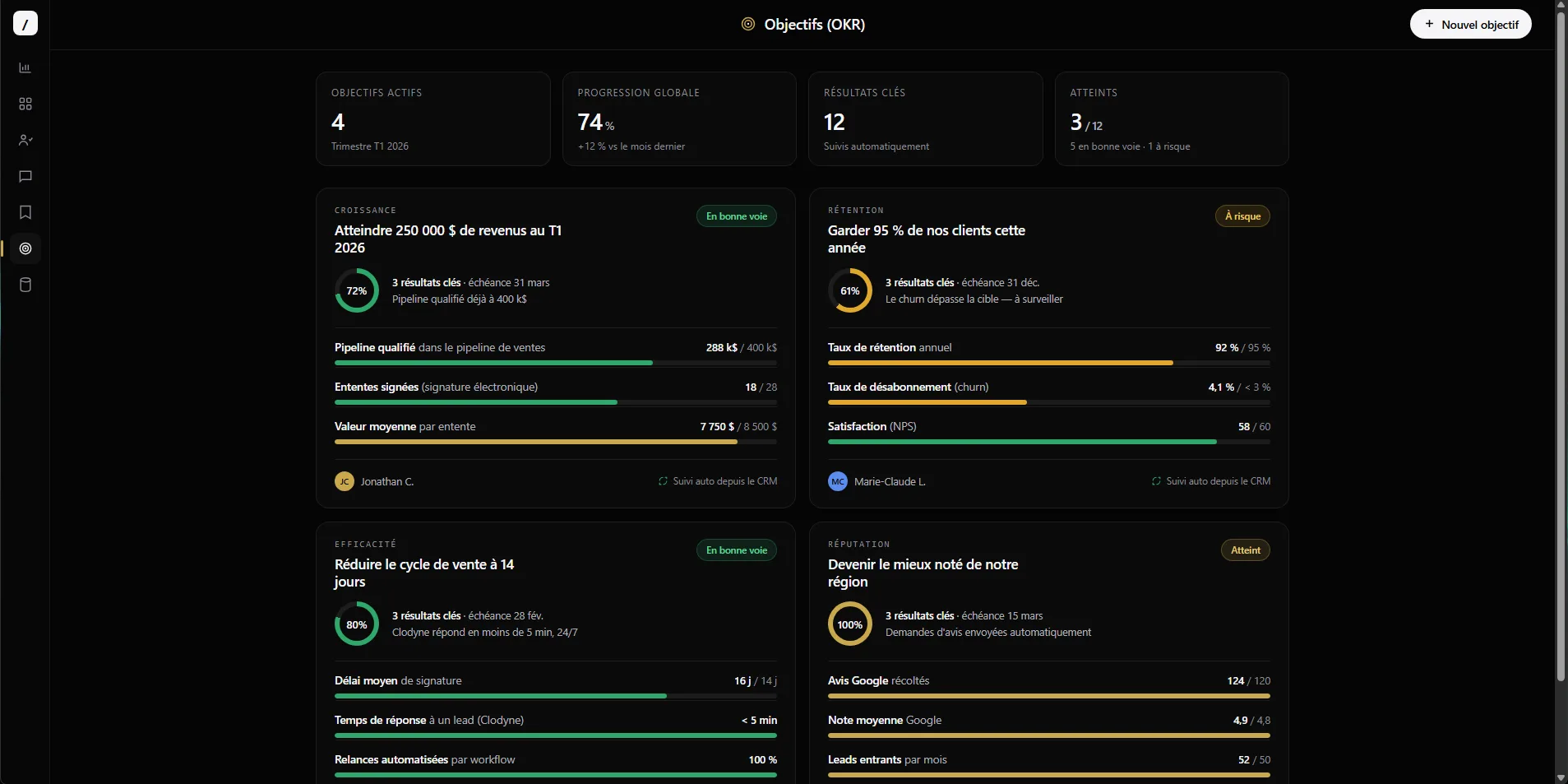
toncrm.io Goals (OKR) page with automatic tracking from the CRM
FIG 0.1 · AUTO-TRACKING

The number comes from the CRM, not from your keyboard.

The same product that sells and invoices is the one that measures the goal. 5 native sources, recalculated every day.

Won deals, paid invoices, CSAT, contacts created, tasks completed. Each key result reads the right table, scoped to your org. No CSV import, no Zapier to a separate OKR tool.

FIG 0.2 · GOAL + KEY RESULTS

One goal. Key results. A bar that climbs.

You set a goal per period, hook key results to it, and each one shows its progress. The goal's score runs on its own from its key results.

Workflow status: not started, on track, at risk, behind, completed.
Progress bar colored by status (green completed, gold on track, red behind).
A key result can stay manual if no CRM source fits.
Q3 Quarter — GrowthOn track
Generate 50 000 $auto · weight x3
34 200 $
30 new contactsauto · weight x1
21
CSAT ≥ 4,5auto · weight x2
4,6
FIG 0.3 · TEMPLATES

You don't start from a blank page.

5 pre-configured templates by trade. They fill in the title, the key results, the units and the tracking sources. You tweak, off you go.

Construction — major jobsites
Won deals + paid invoices
Coach — monthly service
Contacts + tasks completed
Support — team quality
Average CSAT + tasks
Practitioner — profitable appointments
Invoices + contacts created
QC Sales — quarterly
Weighted won deals
Generate 50 000 $weight x3
30 new leadsweight x1
CSAT ≥ 4,5weight x2
Overall score = weighted average by the weight of each key result.
FIG 0.4 · WEIGHT PER KEY RESULT

Not all your key results count the same.

A key result « generate 50 000 $ » can weigh 3× a « 30 new leads » in the overall score. The goal's roll-up computes the weighted average — sophisticated OKRs without coding a single rule.

FIG 0.5 · AUTO-DERIVED STATUS

The system knows you're behind before you do.

Nobody types « I'm behind ». The system compares your real progress to the progress expected on that date in the period, then lights up the right status on its own.

On track
≥ 95% of expected
At risk
≥ 70% of expected
Behind
under 70%
FIG 0.6 · WEEKLY CHECK-IN

The Friday check-in, automatic.

A reminder email goes out on Friday. In 4 questions — status, confidence, blockers, next actions — you keep the team aligned without a meeting. And every check-in captures confidence (low / medium / high): a human signal the progress bar doesn't give.

Weekly check-in
StatusOn track
ConfidenceStrong
BlockerWaiting on a supplier quote
History kept as a timeline — every check-in stays, nothing gets erased.
FIG 0.7 · THE DETAILS THAT MATTER

The kind of stuff you only notice when it's missing elsewhere.

Manual override of a number
A sale recorded outside the CRM? Force a key result's value, with a reason and a timestamp. The auto-tracking respects it.
Quarter, year or your own period
Quarterly, yearly or 100% custom dates. Not locked into the civil calendar.
Visible to the right people
Company, team or individual: the personal goal stays private, the team goal stays with the team.
From company goal to personal goal
Parent goal → children, with the parent's weighted roll-up computed on its own from its key results.
FIG 0.8 · A SINGLE SOURCE OF TRUTH

The goal lives in the tool that achieves it.

A separate OKR tool has to import your data from outside — Notion, an export, a Zapier that breaks. Here, the key result reads the deals table directly. A sale comes in, the goal moves.

vs the others: a dedicated OKR tool = one more product to pay for, connect and keep in sync. Here it's wired into the CRM that already generates the data.
FIG 0.9 · FAQ

Everything about goals.

No. A daily cron recalculates each key result from 5 native CRM sources: won deals, paid invoices, CSAT, contacts created, tasks completed.

Straight from the CRM tables (deals, invoices, surveys, contacts, tasks), scoped to your organization. No CSV import, no third-party integration to wire up.

Yes — 5 pre-configured templates (construction, coach, support, practitioner, QC sales) pre-fill the title, the key results, the units and the tracking sources.

The status is derived from the time pace: it compares your real progress to the progress expected on that date. « On track », « At risk » or « Behind » lights up on its own.

Yes — a manual override (with a reason and a timestamp) forces the value of an auto-tracked key result, for example for a sale outside the CRM.

No. A key result can stay manual if none of the 5 sources fit. You just enter the number yourself whenever you want.
L'entrepreneur d'aujourd'hui
FIG 1.0 · GET STARTED

Set your first goal.

14 days free, no card. Start from a template, then watch the CRM fill the bar on its own.

Free 14-day trial

We'll set up a goal for your trade in a 45-sec demo.

Essai gratuit 14 joursAppeler Clodyne

Ready to see toncrm.io for real? We show it to you set up for your trade.

Book a 15-minute demo — or start your free trial right away.

Free 14-day trial

No credit card · Setup done for you · French-language support

Features