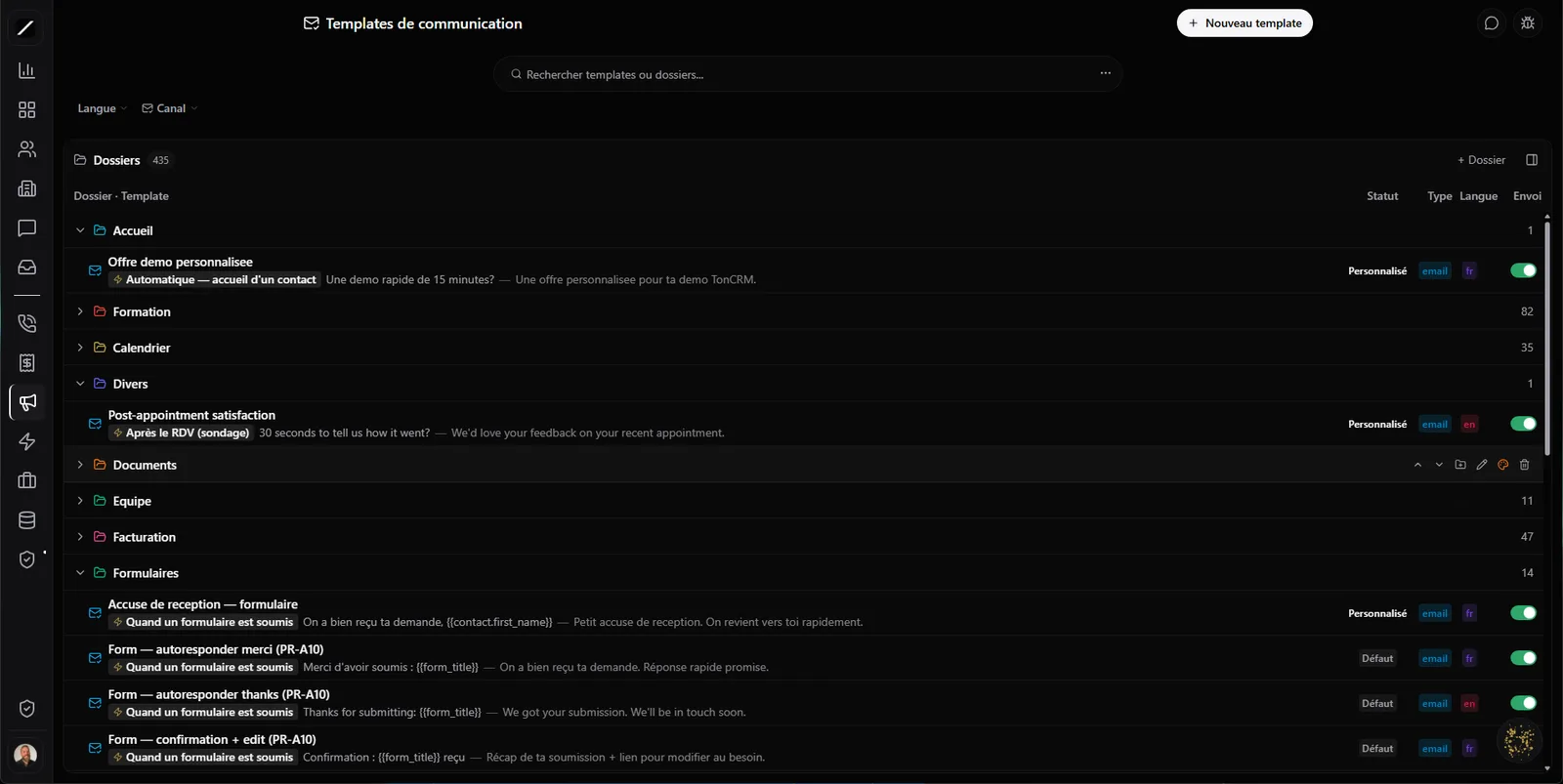
Organized like in Gmail.
Most CRMs give you a flat list of templates that turns into a mess the moment you've got more than ten. toncrm gives you a real folder system, Gmail-style: an accordion with sub-folders on as many levels as you want, and a color per folder that passes from parent to child. You see your structure at a glance.
You reorganize by dragging and dropping your templates from one folder to another (and the folders themselves), and when you search, the view switches to a flat list to find things fast. Most important: no template gets lost after a reorganization — even if you move or delete a folder, its templates are recovered instead of vanishing. You shuffle your structure without ever fearing you'll misplace something.
Email and SMS, in the same place.
Usually, your emails are in one tool and your texts in another. Here, a single page and a single folder tree serve both your channels. You switch between Email and SMS with one click, each template carries a badge that says its channel, and you drag-and-drop both into the same structure. No more second system to learn and maintain just for your text messages.
The preview never lies.
Your preview is not a rough render. It goes through exactly the same path as the real send — the branded envelope with your logo, your variables filled in, your signature. What you see on screen is, pixel-for-pixel, what your client receives.
Most editors have a preview that « drifts » from the final render: perfect while editing, off at the client's end — an image that won't show, a variable left unfilled, a layout broken on mobile. The kind of thing you only notice right after sending, when it's too late. Not here. You validate once, and you're certain of what goes out.
Nearly 200 ready templates — zero setup at launch.
toncrm comes with nearly 200 system templates already written, spread across a dozen categories. And every template exists in French and English — you serve your clientele in their language without rewriting everything twice. On day one, you already have a full library to tweak, instead of an empty box to fill for weeks.
Your templates work inside your automations.
Your templates aren't just for when you click Send by hand. They fire on their own everywhere in toncrm: an automation sends the right template at the right step, an issued invoice goes out with its template, a payment follow-up too, and an appointment confirmation is sent the moment your client books.
You write your template once, and it works for you in the background, on every trigger. That's the difference between a library of texts you copy-paste and a system that communicates for you — always in your voice, always with your signature.
Generate a draft with AI.
Need a new template and don't feel like starting from scratch? Describe what you want to Oracle, and it writes you a draft in seconds, ready to polish. And when you don't know which template to use, Oracle suggests the right one based on the context, the category and the language. The AI gives you a solid starting point; you keep control of the final result.
Never a « I overwrote my text » panic.
Every time you edit a template, toncrm keeps a version. You go back to any previous version in two clicks from the history — no more sinking feeling of realizing you erased a good text with no backup. And while you work, it auto-saves every 3 seconds, with a « Saved 1 second ago » indicator. You lose nothing, ever, even if your browser crashes.
A team-member signature, guaranteed.
Your emails always go out signed by a real person on your team — never an impersonal « The team » that reeks of a robot. The client knows who they're talking to, and it feels a lot more human. And the platform's system messages stay completely separate from your own templates: what belongs to toncrm never pollutes your library, even in the event of a technical hiccup.
And the details that matter.
Your templates, in facts.
- Nearly 200 ready-to-use system templates, bilingual FR/EN
- Email + SMS in a single Gmail-style folder tree
- Preview = real send, pixel-for-pixel identical
- Templates triggered automatically in your follow-ups, invoices and appointments
- AI-generated draft + suggestion of the right template
- Version history + 2-click restore + 3-second autosave
- Per-template analytics · variables with fallback value · CSV export
- Real-member signature · system messages isolated from your library
Everything about your templates.
Organize your templates.
14 days free, no card. Nearly 200 templates are already waiting for you.
Nearly 200 templates are already waiting for you, in French and English.
