Aller au contenu principal
FIG 0.0 · INTEGRATIONS

Your integrations: all green,or not.

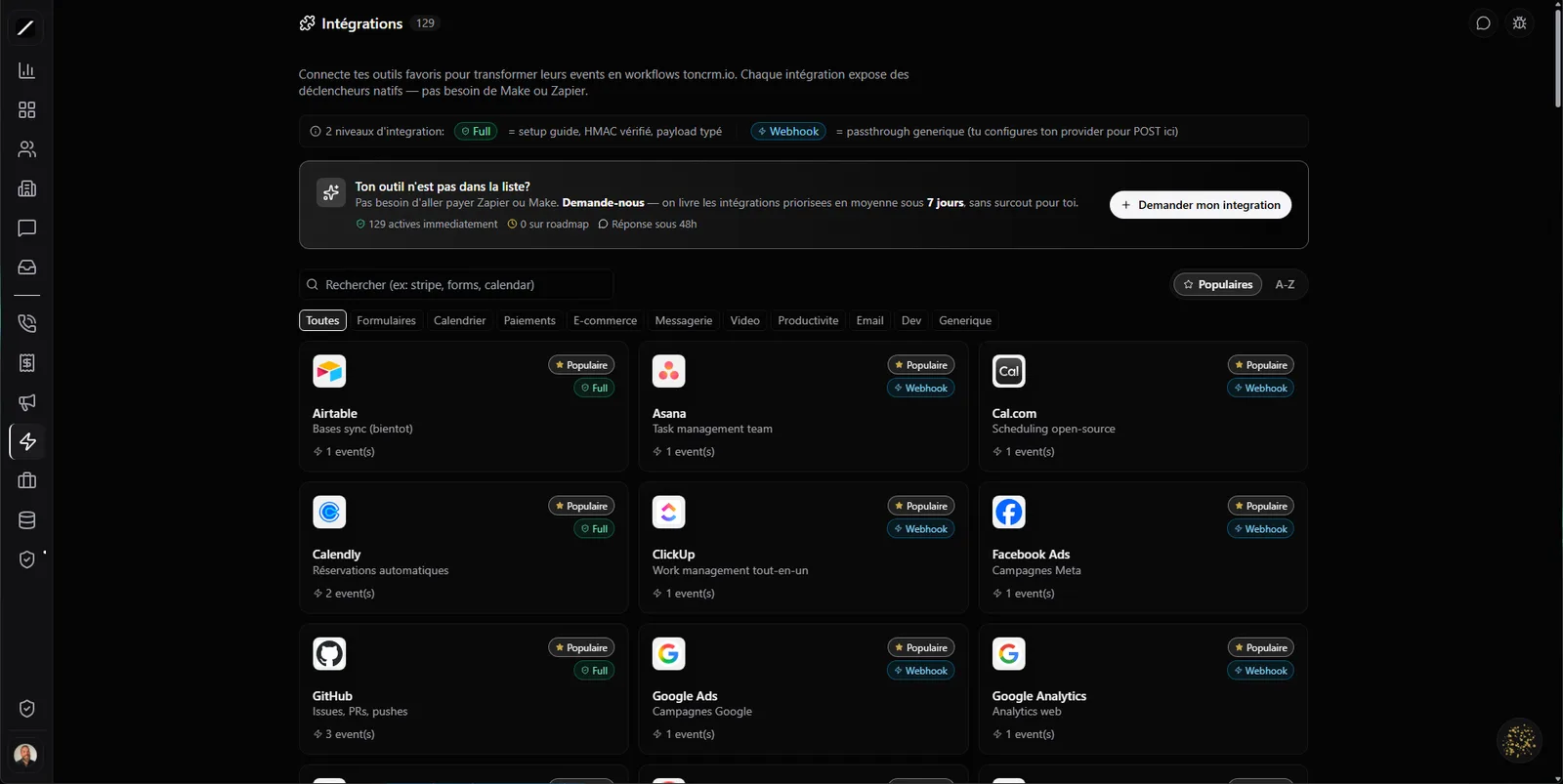
Native integrations that are signed and monitored: Stripe, Shopify, Slack, Calendly, Mailchimp and more. With a secret shown only once, a health dashboard, an audit log, and the replay of a webhook that crashed. Solid native — not a marketplace of a thousand half-maintained connectors.

Free 14-day trial

No credit card required.

Integration health live
Stripe
Slack
Mailchimp
Calendly
toncrm.io integrations: the catalog of native providers with their connection status and the health dashboard.
FIG 0.1 · THE CATALOG

Native and signed. Zero marketplace.

toncrm connects about fifteen providers live, each with its signed webhook and its normalization logic — not a sloppy pass-through. And for all the others, a long list of « upcoming » providers that you can request as a priority: the roadmap is driven by customer votes, not by chance.

Stripe Shopify Slack Calendly Typeform Jotform Mailchimp Discord Notion Airtable Google Sheets GitHub Zoom Eventbrite Generic webhook+ more, voted by customers
Why not « 6000 apps » like a big marketplace? Because a native integration signed, normalized and monitored beats a thousand fragile third-party connectors. For everything else, you've got toncrm's webhooks and triggers to hook up whatever you want yourself.
FIG 0.2 · SECURITY HYGIENE

A secret we show you only once.

Most tools re-show your secret in the dashboard — so anyone with access sees it again. toncrm does the opposite: the secret is generated server-side and shown only onceat connect time. It's the kind of hygiene you expect from a payment system, applied to all your integrations.

Secret shown only once
Generated server-side, visible when you connect, never re-shown in the dashboard.
Signed webhook
Every inbound call is verified on both ends, in constant time.
Double barrier
A token in the URL + a signing secret: two locks, not one.
No double-processing
The same event arriving twice gets processed only once.
Admins only
Connecting, disconnecting or rotating a secret: owner / admin / manager.
Replay protection
An old replayed message is rejected, within a few-minute window.
FIG 0.3 · FORENSICS

Who disconnected what, and when.

The day an integration stops working, the first question is « what changed? ». toncrm has the answer: an audit log records every connection, disconnection, secret rotation and token refresh — who, when, from which address. No more mystery, no more « it worked yesterday ».

Stripe connectedJonathan · June 14 · 10:02 AM
Webhook secret rotatedMélanie · June 16 · 9:18 AM
Slack disconnectedAdmin · June 17 · 11:40 AM
Integration health real time
StripeLast event 2 min ago
SlackSigned · OK
MailchimpToken expires in 4 d
CalendlyOK
FIG 0.4 · MONITORING

All green — or you know which one isn't.

A health dashboard shows you the status of each integration: healthy, warning or down. You see at a glance which token expires soon, which ones are piling up failures, and which ones need your attention — before a client tells you « I never got my receipt ».

Instead of stumbling on a broken integration by accident, you see it turn yellow and you fix it before it becomes a problem.

FIG 0.5 · RECOVERY

A webhook crashed? Replay it.

A network hiccup, a deploy on the provider's side, and a webhook gets lost. Instead of digging through logs, you replay it in one click from the interface — toncrm runs it back through the whole pipeline, as if it just arrived. You take back control of a missed event instead of losing it.

evt_charge.succeeded · network failure
Replayed · delivered 200
FIG 0.6 · OVERVIEW

Ask for the state of your integrations.

You can ask the assistant to list your integrations or give you a health snapshot(tokens about to expire, failures in the last 24 h) — read-only. It looks for you, but it can't connect or disconnect: those actions stay in the hands of your admins.

“Which integration needs my attention?” — instant answer
FIG 0.7 · AT A GLANCE

Your integrations, at a glance.

About fifteen native providers connected live, each with a signed webhook
A long list of upcoming providers, prioritized by customer votes
Webhook secret shown only once (generated server-side) + double barrier token + secret
No double-processing (idempotency) + replay protection
Admin-only permissions · connect / disconnect / rotate a secret
Audit log: who connected or disconnected what, when, from which address
Health dashboard (healthy / warning / down) + manual webhook replay
FIG 0.8 · FREQUENTLY ASKED

Everything about integrations.

About fifteen providers connected live (Stripe, Shopify, Slack, Calendly, Mailchimp, Notion, Airtable, Google Sheets and more), with a long list of upcoming providers, prioritized by customer votes.

It's a choice: native integrations, signed and monitored, rather than a third-party marketplace. For the rest, you use toncrm's webhooks and triggers.

The webhook secret is shown only once, every webhook is signed, there's a double barrier token + secret, replay protection and admin-only permissions.

Yes — a health dashboard shows the status of each integration (healthy, warning, down), with token expiry and recent failures.

Yes, you can replay a webhook manually from the interface, up to five times.

Only owners, admins and managers — and every connection or disconnection is recorded in an audit log.
L'entrepreneur d'aujourd'hui
FIG 0.9 · GET STARTED

Hook up your tools, with peace of mind.

14 days free, no card. Or book a demo, we'll hook up your integrations with you.

Free 14-day trial

We hook up your integrations with you in a 45-sec demo.

Essai gratuit 14 joursAppeler Clodyne

Ready to see toncrm.io for real? We show it to you set up for your trade.

Book a 15-minute demo — or start your free trial right away.

Free 14-day trial

No credit card · Setup done for you · French-language support

Features