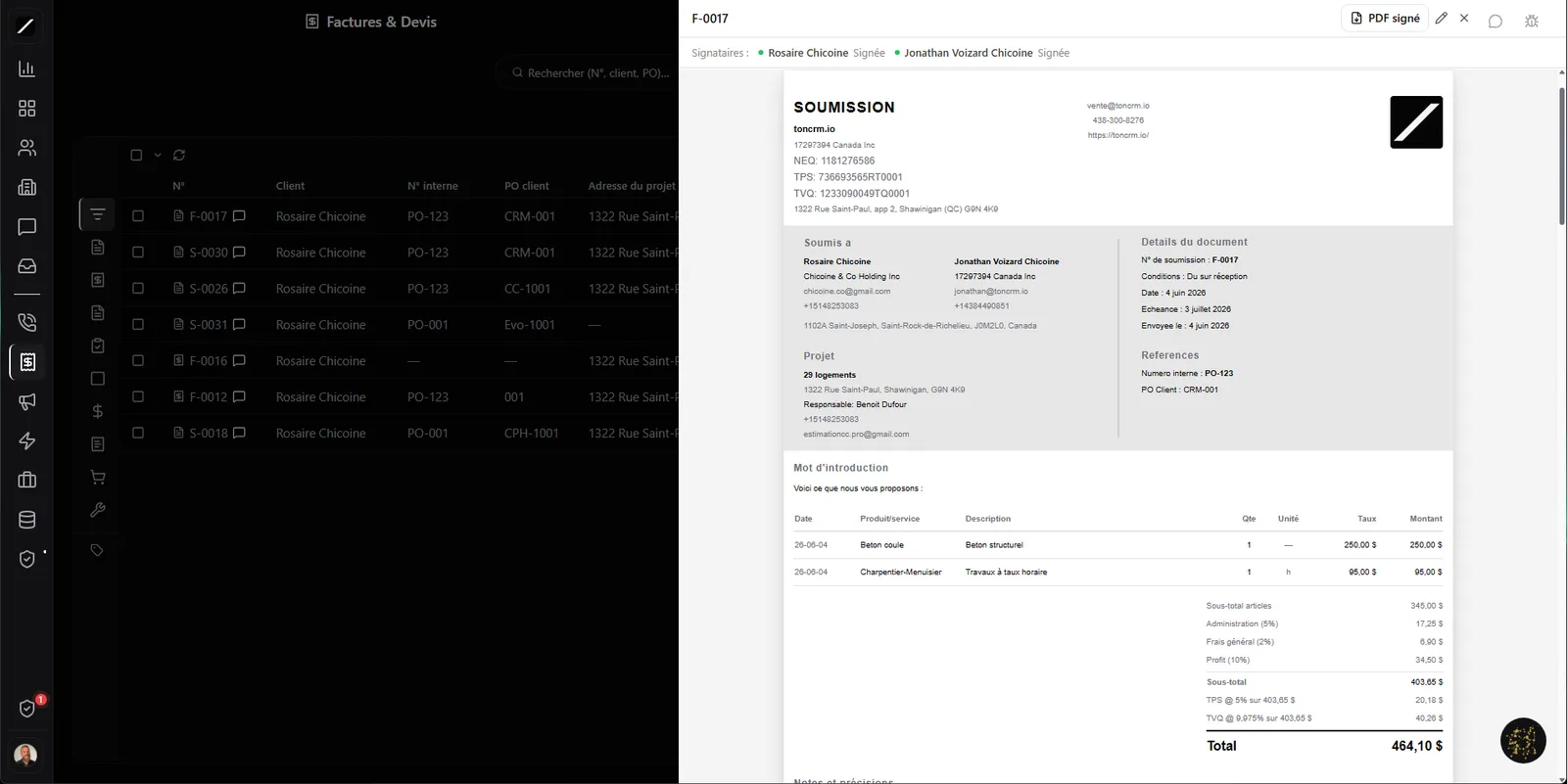
Editor on the left, live PDF preview on the right — pixel-perfect.
One builder, ten types of documents.
Most contractors juggle three tools: one for quotes, one for invoices, one for bids. Here, it's one builder for ten types. Same interface, same PDF, no matter what you create.
You just turn on the sections you need: intro, notes, photos (handy on a job site), clauses, payment schedule, signature. The editor is a Word-style split screen — on the left what you type, on the right the 8,5 × 11 page exactly as it'll come out in PDF. What you see is what your client gets, pixel-perfect. And you reuse your clause library instead of rewriting them.
Your client negotiates their quote — inside your CRM.
Usually, a quote negotiation gets lost in an email chain. toncrm puts one discussion thread per quote, right inside your invoicing module. The client asks questions, requests an adjustment, and you reply without ever leaving your invoices.
You spot unread threads at a glance, filter “all” or “unread,” and the negotiation stays attached to the right quote. You've got the full history of how you landed on the final price.
A Law 25-compliant signature — without paying for an add-on.
E-signature is often a pricey separate subscription (think DocuSign). Here, it's included and compliant with Law 25 and Quebec's legal framework. Your client signs in a few seconds, and the signature leaves an independently verifiable fingerprint — not just a pasted image, a proof that holds up.
When a document needs several signers — co-signer, guarantor, witness — toncrm handles it by freezing each person's details at signing time. The PDF reflects exactly who signed what, at that moment. It's your signature under your brand, not a third-party service coming between you and your client.
Signed = deposit invoiced on its own.
Quote signed? toncrm creates the deposit invoice automatically, at the amount of the first milestone. Nothing to retype, nothing to recalculate — the second the signature comes in, the deposit is invoiced.
And you attach your payment milestones to real triggers: on signature, at mid-project, on delivery, on completion, on a date, or at a job-site milestone you describe yourself. Each payment unlocks at the right moment. No more chasing the deposit and wondering when to bill the next installment.
Let your clients finance their projects — and keep the leverage.
A differentiator QuickBooks and Wave don't have: you can offer your client to finance a big project over 2 to 60 monthly payments, paid by card. A client who couldn't put down 8 000 $ at once can say yes to 700 $ a month — and you sign the contract instead of losing it.
And you're protected: 30 days of grace, then late-payment interest, and if it goes past 60 days, the deliverable can be suspended until payment. The contract is signed electronically, and ownership of the deliverable transfers on the final payment. You give your client a way to say yes, without carrying the risk of not getting paid.
Reminders up to the formal demand letter — automatically.
An unpaid invoice is money sitting idle. toncrm handles it on its own in five graduated stages, with wording grounded in the Civil Code of Québec (late-payment interest is owed as of right). The tone ramps up on its own, no double sends, and on day 60 the person in charge of collections is notified (email + SMS).
You see when, how many times, and where your quote gets opened.
Every time you edit a document, toncrm keeps a version — who changed what, when, why. You've got a full timeline of how a quote evolved.
And every time your client opens the document, a counter ticks up: “Seen 3 times”, with the time and the source. “I never got that” doesn't hold up anymore — you've got proof the invoice was opened three times on a given day. Valuable if it ends up in small claims court.
GST + QST calculated natively — no external module.
Quebec taxes are handled directly: 5 % GST + 9,975 % QST, calculated on their own, multi-province with a fallback to Quebec. You set your payment terms — due on receipt, net 15, net 30 or net 60 — and the due date calculates itself. For Interac, the real deposit address shows up in the email (with security question and answer). And your client pays by card on a public portal, no account to create.
Leave QuickBooks in a few clicks.
Switching tools is scary because of the history. toncrm imports your invoices from QuickBooks or Wave with a per-tool preset: it detects on its own how your columns line up and normalizes dates, amounts and statuses. You bring your history back without retyping everything.
On the payments-received side, a bank reconciliation matches amounts and dates, with anti-double-payment protection so you don't record the same incoming money twice.
And all the details that make the difference.
Invoicing, in facts.
- 10 document types in one builder (quote, invoice, bid, PO, receipt…)
- Law 25 / Quebec legal framework-compliant signature, included (not an add-on)
- Native GST + QST (5 % + 9,975 %), no external tax module
- Client financing over 2 to 60 months, with suspension leverage
- 5-stage follow-ups up to the formal demand (Civil Code of Québec)
- Auto deposit on signature · open tracking (“seen 3×” + source)
- Import from QuickBooks / Wave
- Thread-based negotiation attached to each quote
Everything about invoicing.
Get paid faster, retype nothing.
14 days free, no card. Or book a demo and we'll build your first quote with you.
We build your first quote with you during the demo.
