One account, all its contacts, all their history.
The complete B2B account. Group your contacts, your deals, your invoices and all of a client's activity under a single company. A contact can belong to several companies with dated roles, your NEQ fills in on its own, and you see each account's health at a glance.
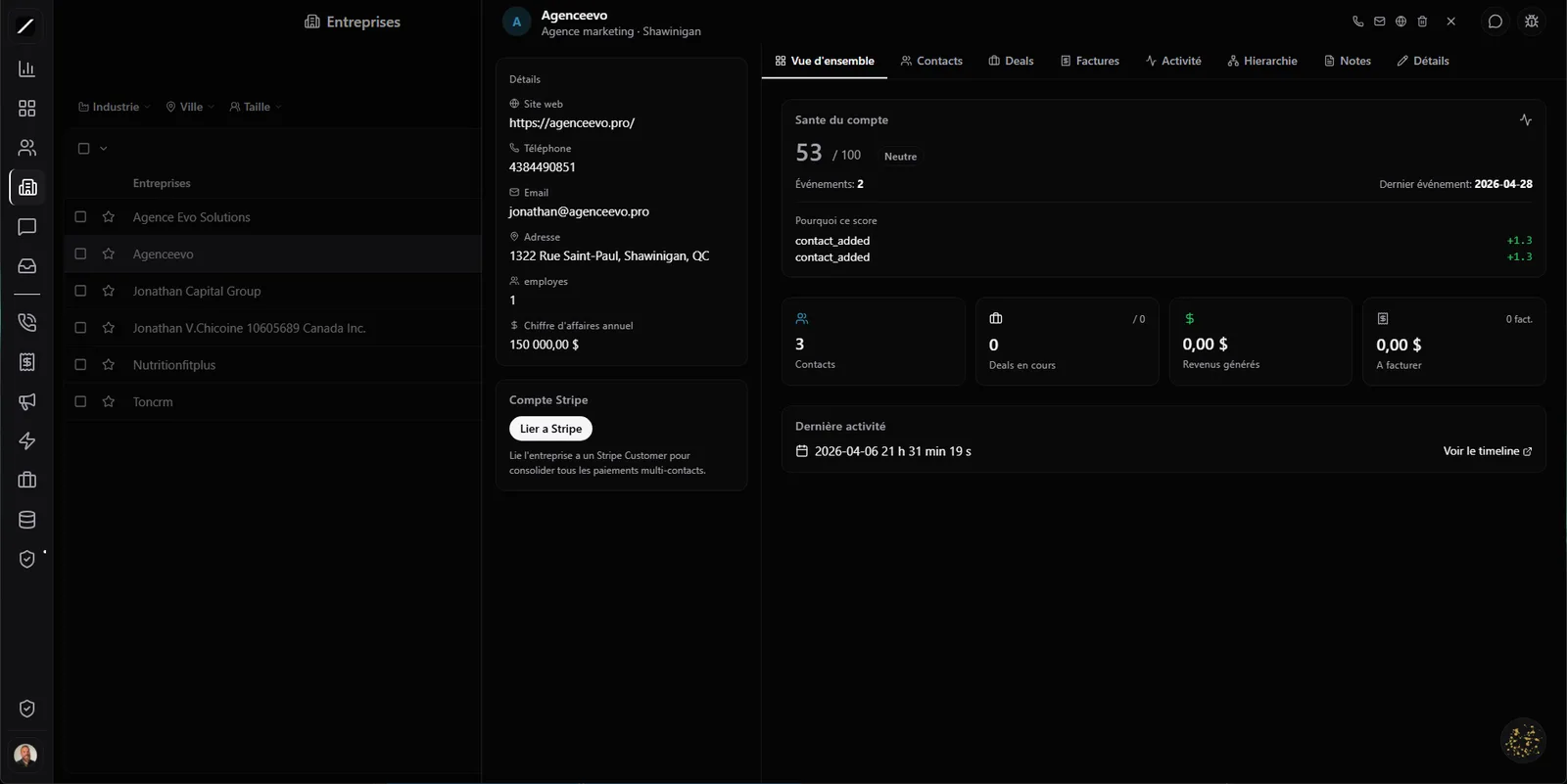
The B2B account, in full.
In B2B, you're not selling to a person — you're selling to an organization with several decision-makers. The toncrm company page is built for that: 8 tabs that give you the full picture of an account without ever leaving the page.
And best of all: your deals and your invoices are attached to the company natively, not just to the contact. When you click “Create a deal” or “Create an invoice” from the page, the company name is already filled in. You retype nothing.
The history of real life.
This is where toncrm does what most CRMs don't. Most of them store a simple association — “this contact belongs to this company”, period. Real life isn't like that.
A contact can be CTO at Acme until May 12, then VP Engineering at TechCorp after that. toncrm stores the role, the title, since when they've held it, and until when. A contact can be linked to several companies at the same time, each with its own dated role.
And former employees stay attached — marked as gone, but findable. When you wonder “who was our contact at this client two years ago?”, the answer is right there.
Your whole sales history in a single thread.
The Activity tab aggregates every interaction with any human at the company — no matter who talked to whom. The CEO's emails, the CTO's texts, the call to the accountant, your rep's notes: all in one single chronological thread.
You open an account's file before an important call, and in 5 seconds you see everything that's happened with that company, across all your contacts. And you can export this timeline as a PDF to share it or archive it.
Québec NEQ — filled in on its own.
Enter an account's NEQ (Québec enterprise number), and toncrm fetches the info directly against the register of the Registraire des entreprises du Québec. A “Search the REQ” button, 10-digit validation, cached results.
No English-language CRM connects to the Québec business register. For a local business doing B2B, that's less data entry and more reliable data.
You also have your own NEQ at the organization level (on top of each client account's NEQ) — it prints automatically in the header of your invoices.
The health of every account.
Every company has its health score — not just your individual contacts, the whole account. Baseline at 50, and it moves with every event — a won deal adds +20, a paid invoice +15, a lost deal −10 — with decay over time (not just a nightly cron). A health card gives you the grade at a glance, and the score is back-calculated from your existing history.
You ask Oracle “analyze this B2B account's health” and it lays out the picture: where things are going well, where they're slipping, what deserves your attention. You see which clients are solid and which ones are slipping through your fingers.
Parent / subsidiary hierarchy.
Your biggest clients often aren't one company — they're a group with a parent company and subsidiaries. toncrm handles that: link a company to its parent, and you get a real tree with breadcrumb, depth and root. You see a group's full structure, and you navigate between entities in one click.
Impact-ranked dedupe + idempotent merge.
Company duplicates are inevitable when several people enter data. toncrm detects them by normalized name + similarity, and ranks them by impact: the duplicates affecting the most contacts rise to the top. You fix what hurts most first.
The merge is idempotent: it repoints every contact, deal and invoice to the main company, and archives the duplicates. Click twice by accident? Same result, no damage. And every merge is logged in detail — who merged what, when, how many contacts/deals/invoices it moved. Six months later, you can reconstruct exactly what happened. For big cleanups, the “Merge all” button clears your duplicates in bulk.
Map view, Stripe and smart addresses.
- Map viewYour companies on a geographic map. Handy for planning routes or seeing your client concentration by region.
- Stripe link at the company levelLink the Stripe customer to the company, synced automatically — billing and the CRM talk to each other.
- Address autocompleteYou start typing, the full address fills in (Google Places).
And all the details that make it a pleasure.
The B2B account, in facts.
- 8 tabs per account (Overview, Contacts, Deals, Invoices, Activity, Hierarchy, Notes, Details)
- Dated roles: one contact, several companies, with start/end dates
- NEQ verified against the Québec register — per account AND at the org level (invoice header)
- Health score per account, recalculated with every event (won deal +20, paid invoice +15…)
- Custom objects: your own record types, without touching code
- Unlimited parent / subsidiary hierarchy
- Idempotent merge + impact-ranked dedupe
- Bulk up to 200 accounts
- PDF export of the timeline (up to 100 events)
Bring your accounts together.
14 days free, no card. Or book a demo — we'll set up your B2B accounts with you.
