Aller au contenu principal
FIG 0.0 · CONVERSATIONS

8 channels. 1 thread per client.1 single inbox.

SMS, email, calls, web chat, Messenger, Instagram, WhatsApp, phone — all your inbound channels merged into a single inbox, one thread per client. Oracle suggests replies, translates live, and you can unsend for 30 seconds just like in Gmail.

14-day free trial

No credit card required.

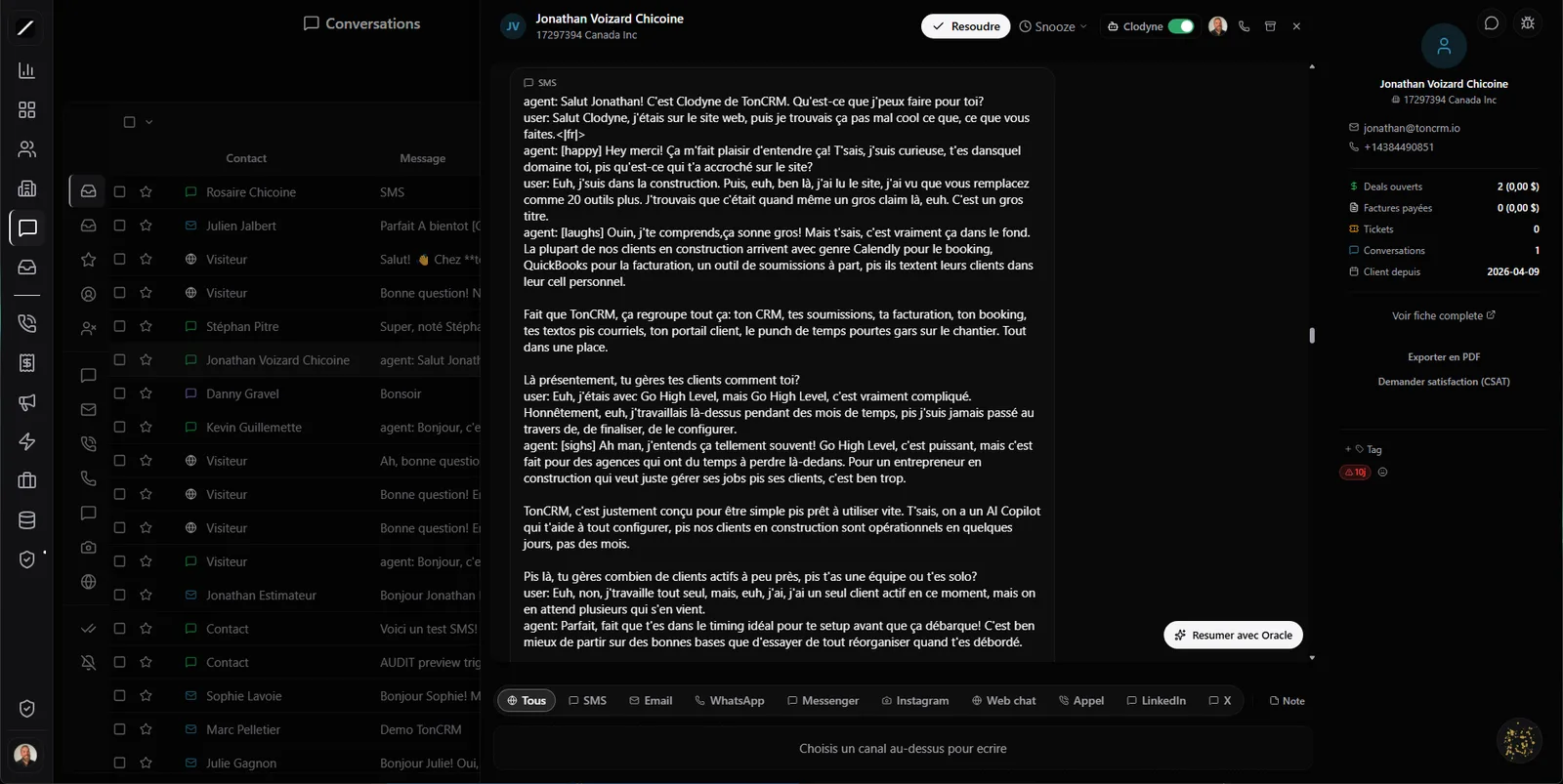
toncrm.io multi-channel inbox: conversation list on the left, unified thread in the center, contact record on the right, and composer with SMS, email, WhatsApp, Messenger and Instagram tabs.
FIG 0.1 · UNIFIED INBOX

Eight channels. One single thread per client.

Your client writes on Messenger Monday, texts you Tuesday, then calls you Wednesday. In most tools, that's three conversations scattered across three apps. In toncrm, it's a single thread.

All 8 inbound channels land in the same inbox, grouped by contact. You see the whole conversation with a person in one place, no matter how they reached out.

And visually, you instantly know who's talking: the client's messages on the left, yours on the right, Clodyne's (your AI voice agent) in a gold gradient with its label, and system messages in the center. The composer auto-detects the right channel for the thread — you type, it goes out the right way.

SMS Email Calls Web chat Messenger Instagram WhatsApp Phone
Marie-Claude Roy · 1 thread, 3 channels
Messenger
Hi, are you still doing roofing this fall?
SMS
Yes! We've got room in September. Want me to send you a quote?
Clodyne · Call
Missed call transcribed — the client confirms the job site address and her approximate budget.
WhatsApp
Perfect, yes send it over 🙏
9 layers before an AI replies
1Deterministic filter (zero AI): auto-reply headers
2noreply@ addresses / newsletters
3Known system notifications
4List of automated senders
5AI intent analysis + confidence threshold
6Oracle's additional tiers
7Agent-side guard (refuses to reply)
8Periodic retroactive sweep
9Alert if too many false leads detected
FIG 0.2 · INVISIBLE ENGINEERING

The anti-loop defense in 9 layers.

Here's something no competitor shows publicly. When an AI replies to inbound emails, there's a real risk: an auto-responder on the other end, then your AI replies to its auto-reply, which replies to your reply… an infinite loop that spams everyone and burns through your quota.

toncrm has 9 layers of defense to prevent that. The first is deterministic, with no AI at all: it recognizes auto-replies, noreply@ addresses, newsletters, notifications and a long list of automated senders. What gets through is filtered by an intent analysis with a confidence threshold, and a retroactive sweep catches anything that slipped by.

Intercom, Front and HubSpot have filtering, but not a 9-layer defense like this one. It's engineering you don't see — until it saves you from a disaster.
FIG 0.3 · ORACLE IN YOUR INBOX

The AI that saves you serious time.

Oracle lives in your inbox. Every AI call is secured against injections, and you get a visible quota with an alert before you hit it.

Suggests 3 replies
Based on the last 10 messages in the thread, tuned to the channel's length (short for an SMS, longer for an email). You pick and you tweak.
Translates live FR ↔ EN
A client writes to you in French? One click, the bubble translates. You reply in your language, they read theirs.
Summarizes the conversation
You jump into a long thread, Oracle sums it up with the key points.
Auto-resolution
For simple questions, Oracle proposes a reply and can mark the conversation resolved when it's confident enough.
Clodyne autopilot — ON / OFF per thread
Clodyne can reply on its own in a conversation — and the moment you grab the keyboard, it goes quiet automatically. Turn it back on whenever you want. Control stays with you, thread by thread (no more « AI that's too aggressive »).
FIG 0.4 · SAFETY NET

Scheduled send and undo of 30 seconds.

You bang out a reply in the heat of the moment, then realize you should have worded it differently? Unsend it for 30 seconds, just like in Gmail. The message is pulled back before it even reaches the client.

And you can schedule a send for later — write your reply at 11 PM, it goes out at 8 AM the next morning, at the right time.

Message sent Undo · 30 s
Scheduled for tomorrow 8:00 AM
« urgent » keyword→ Jonathan
Instagram channel→ marketing team
round-robin rotation→ least busy
FIG 0.5 · DECLARATIVE ROUTING

Routing that assigns on its own.

Stop assigning conversations by hand. You declare rules once, then it runs: « keyword urgent → assign to Jonathan », « Instagram channel → assign to the marketing team », or simply a round-robin rotation that hands off to the least busy person. The right conversation lands with the right person without you touching a thing.

FIG 0.6 · BUILT FOR CANADA

After-hours calls — answered anyway.

A client calls at 7 PM, after you close. Elsewhere, they leave a voicemail — and often a lost lead. Here, an automatic bilingual response goes out based on your business hours, the call is transcribed and logged in the conversation, and you find it all the next day.

The Canadian construction/service pattern: the client calls after 5 PM, the boss can't answer, but he doesn't lose the lead anymore.

FIG 0.7 · CLIENT SATISFACTION

The detractor — you spot it right away.

After a conversation, your client gets a mini satisfaction survey (1 to 5) they fill out without having to log in — a public page, one click. If the rating is low, a comment is required, and you see the detractor in real time, before the frustration turns into a bad Google review.

How was your experience?
1 3 5
Public page · no login required
FIG 0.8 · THE POLISH

The living inbox.

It's in the details that you feel a tool built for real.

Starred conversations
Star an important thread and find it again in the « Starred » tab.
💬 button everywhere
On every invoice, quote or project — one click opens the contact's thread, with the record attached for reference.
« Assigned to » filter + bulk actions
Collapsible channel rail (All / Unread / Starred / Assigned), filter by person, handle several threads at once.
Infinite pagination
No more 500 cap — the thread list scrolls without limit, split 3-column view.
Sentiment indicator
😊 / 😐 / 😞 per message — you read the mood at a glance.
SLA badge
Tracks your first-response time.
Real-time typing
Typing indicators + a warning if a coworker is editing the same thread as you.
Read receipts
Sent → delivered → read.
Macros + internal notes
Pre-written replies and notes invisible to the client to coordinate as a team.
Visible AI → human handoff
The client knows when they move from the AI to a real person.
PDF / CSV export
A full thread as PDF, the history as CSV.
TikTok publishing
OAuth connection to publish on TikTok from the social module — this is not an inbound messaging channel.
FIG 0.9 · CONVERSATIONS BY THE NUMBERS

The inbox, in facts.

  • 8 inbound channels unified into 1 thread per client
  • 9 anti-loop defense layers before an AI replies to an AI
  • 3 replies suggested by Oracle, adapted to the channel's length
  • Live FR ↔ EN translation, in 1 click
  • 30-second undo on every send · scheduled send
  • CSAT 1-5 on a public page, no client login
  • Round-robin / keyword / weighted routing, declarative
  • Automatic bilingual response to after-hours calls
FIG 1.0 · FREQUENTLY ASKED

Everything about conversations.

SMS, email, calls (transcribed), web chat, Messenger, Instagram, WhatsApp and phone — all in a single thread per client.

Yes, for 30 seconds after sending, just like in Gmail.

Oracle suggests replies and can auto-resolve simple questions, but you stay in control. A 9-layer defense prevents AI-to-AI loops.

Yes — automatic bilingual response based on your schedule, call transcribed and logged in the conversation.

No. The CSAT survey lives on a public page, no login.
L'entrepreneur d'aujourd'hui
FIG 1.1 · GET STARTED

Bring together all your conversations.

14 days free, no card. Or book a demo, we hook up your channels with you.

14-day free trial

We hook up your channels with you in a 45-sec demo.

Essai gratuit 14 joursAppeler Clodyne

Ready to see toncrm.io for real? We show it to you set up for your trade.

Book a 15-minute demo — or start your free trial right away.

Free 14-day trial

No credit card · Setup done for you · French-language support

Features