Your video calls live in your CRM — not one more account.
Here's the thing neither Calendly nor the others do: when you create a video appointment, toncrm generates its own video link, hosted on our own infrastructure. No Zoom account to hook up, no Google Meet, no app for your client to download. They get a link, they click, they're in the call. That's it.
And it's built for a real appointment: the link opens 15 minutes before the scheduled time and closes 30 minutes after. Outside that window it denies access — no waiting room where strangers knock at the door, because it's a scheduled meeting between you and your client.
The link is locked to the appointment from the moment it's created and shows up everywhere: confirmation, reminders, calendar file. When the time gets close, the event starts pulsing with a « Join the call » button. You never dig through your emails — it's right there, in front of you, at the right moment.
Your clients' booking, in your own brand.
Your clients book themselves, on a public page in your image — standalone with your own address, or embedded right on your website with your colors, not someone else's logo over your business. A host card with your photo up top, your configurable appointment types below (duration, location, color, availability).
You ask questions before the appointment so you show up prepared, and you can require a Stripe deposit at booking — GST and QST calculated automatically. That's what kills no-shows: once someone's put twenty bucks down, they show up a whole lot more often. And your revenue is traceable back to the original appointment.
Four location types, written correctly everywhere.
Whatever type you pick, the info is written correctly everywhere — confirmation, reminders, SMS, calendar file, interface — with never an inconsistency or a « Location: empty » field.
The Google + Outlook sync that makes no ghosts.
What you create here shows up there, and what you create there shows up here. So far nothing new — except we fixed the worst bug in calendar syncs, the one that drives people crazy.
When you delete an event and the deletion fails on the provider's side (expired token, limit hit, connection dropping), most tools bring the event back on the next sync. toncrm keeps a record of deletions for a month and refuses to resurrect what you erased. You delete it once, it stays dead. No ghost, no duplicate growing back.
Check off your appointment without losing it.
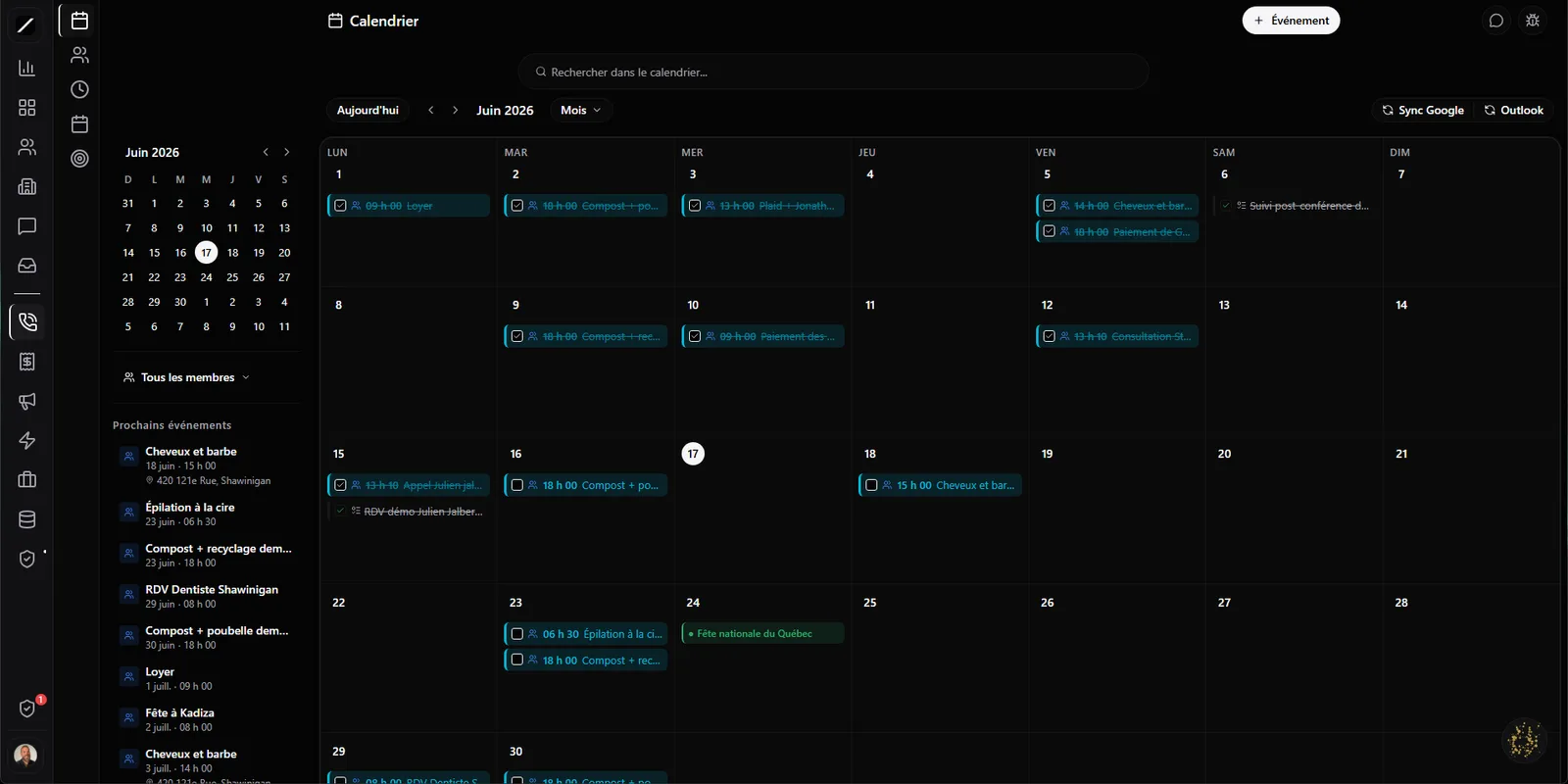
You can check off an event right on the grid, like a finished task: it gets struck through but stays visible, and it never touches your Google or Outlook copy. You can also convert an event into a task in your Kanban without deleting anything — the event stays put, a linked task is created next to it.
It's a rework we did after a real incident: before, « convert » erased a recurring rent from a user's Google Calendar, with no warning. Never again. The rule: an action in toncrm never erases data at your provider by surprise.
Reminders on three channels — with no duplicate.
If you already use Google's or Outlook's reminders, you don't end up with three notifications for the same appointment: you can tell toncrm to cut the provider's native reminder and keep only its own.
Your guests reply without creating an account.
An event can have several guests, and each can reply — accepted, declined, maybe, with a comment — without having to log in or create an account. One click in the email, it's answered. You know who's coming and who isn't, without chasing anyone.
And when a slot is full, people can join a waitlist. If a spot opens up, toncrm automatically notifies the next person in line. You fill your last-minute cancellations on your own, without chasing people down.
Québec's holidays, already in your calendar.
toncrm calculates Québec's holidays on its own — New Year's Day, the Fête nationale on June 24, Canada Day, National Patriots' Day, Easter, Good Friday, Easter Monday, Labour Day, Thanksgiving, Christmas — and it blocks the slots on those days. Nobody books an appointment with you on June 24 by accident, and you don't end up working a holiday because an American tool doesn't know your calendar. No English-language calendar does this for you.
An interface you already know.
The calendar is built like Google Calendar — nothing to relearn. A side panel gives you a mini-calendar, a filter by member, and the list of your upcoming clickable events. Each member has their own color, so a glance is all it takes to see who's doing what.
You navigate in month, week or day view (on mobile it switches to day view to stay readable with a thumb), and you choose whether your week starts on Sunday or Monday. It's your calendar, arranged the way you think.
Recurrence, multiple calendars and private events.
Five ways to assign an appointment.
If several of you take clients, toncrm splits new appointments by whichever rule suits you. And when a call goes through Clodyne, the voice can route the client to the right member based on what they're after. Nobody ends up swamped while another waits.
And the details that dodge the little bugs.
The calendar, in facts.
- Calendar + public booking + video in a single tool (replaces Calendly + Zoom + Meet)
- Video hosted by us, per appointment — window 15 min before → 30 min after
- Two-way Google + Outlook sync, anti-resurrection
- Email + push + SMS reminders, no duplicates
- Public RSVP with no login + automatic waitlist
- Stripe deposit at booking (GST/QST auto)
- 5 team assignment modes
- Québec holidays calculated and blocked natively
Everything about the calendar.
Put away Calendly, Zoom and Meet.
14 days free, no card. Or book a demo — we'll set up your booking page with you.
We'll set up your booking page with you.
